
Steam · Steam Families
How to share games on Steam with Steam Families
Steam game sharing now runs through Steam Families, which replaced the old Family Sharing and Family View. Up to 6 people in one household see each other's libraries and can play different games at once — but the same game needs a second copy, and an adult leaving a family must wait 1 year from the date they joined it before joining another family.
Last checked:

| Rule | Value | Status |
|---|---|---|
| Family size | Up to 6 members | official only |
| Intended for | A household of close family members | official only |
| Different games at the same time | Yes | official only |
| Same game at the same time, one copy | No — someone needs a second copy | official only |
| Leave and join another family | Wait 1 year from joining the previous one | official only |
| Empty slot reuse | 1-year cooldown per slot | official only |
Steam Families rules from Valve's user guide and FAQ, checked 20 Nov 2026.
Create a Steam Family and invite people
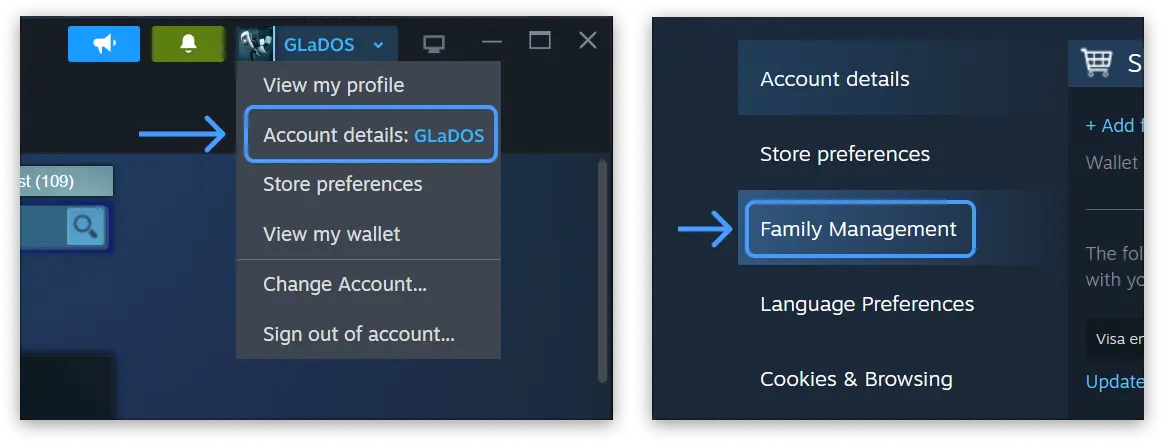
- 1 In the Steam client or at store.steampowered.com, open your account menu and choose Account details, then Family Management.
- 2 Select Create a family and give it a name.
- 3 Choose Invite a member, pick each person from your friends list and set them as an adult or a child.
- 4 Each person accepts the invitation from their own account.
- 5 Shared games now appear in everyone's library. Open the library filter to show or hide games from the family.
What gets shared and what does not
| Item | Shared in the family? |
|---|---|
| Base games owned by any member | Yes |
| DLC | Only DLC the publisher marked shareable, from the copy you launch |
| Free-to-play games and DLC bought for them | No |
| Games that need a third-party key, account or subscription | No |
| Region-restricted games and DLC | No |
| Games that don't support the other member's operating system | No |
| Games the publisher opted out, or the owner marked private | No |
| Offline play of a family game | Yes, if the game supports Family Sharing |
Ownership never moves: every game stays with whoever bought it, and new purchases appear in the family collection automatically. Valve does not publish a full list of publisher opt-outs, so check the store page of a specific game before you rely on it.
The same-game rule
Valve's own example makes this concrete: with one copy of Portal 2 and one copy of Half-Life in the family, one person can play Portal 2 while another plays Half-Life. If two people want Portal 2 at the same time, someone has to buy a second copy. The whole topic — including Remote Play Together for local co-op — is on can two people play the same Steam game at once?
Cooldowns, households and ban risk
- Leaving: adults can leave any time, but must wait one year from when they joined the previous family before creating or joining a new one. You may rejoin the family you just left without waiting if it still has fewer than six members.
- Slots: when someone leaves, their slot stays on a one-year cooldown before a new member can take it.
- Household: Valve describes families as a household of close family members and says requirements may change. I don't publish ways around that check.
- Cheating: if a family member cheats or commits fraud in your shared game, Valve may revoke your family privileges and your own account may be VAC banned.
Moving from the old Steam Family Sharing
If you followed an older guide that talks about Steam Family Sharing or Family View, Valve says both have been replaced by Steam Families. In the new system you invite people from your friends list and give each one an adult or child role. Sharing your password instead is against the Steam Subscriber Agreement. For PC games bought elsewhere, see game sharing on PC.
Questions people ask
How many people can be in a Steam Family?
Can two people play the same game at once?
Can family members live in different houses?
What is the 1-year cooldown?
Do I lose my games if I leave a family?
Can a family member get me VAC banned?
Sources
- Steam Support: Steam Families User Guide & FAQ — checked 2026-11-20
- Steam Subscriber Agreement — checked 2026-11-20
- Steam: Remote Play and Remote Play Together — checked 2026-11-20
- Steam on YouTube: Introducing Steam Families — checked 2026-11-20
How sources are counted and re-checked: editorial policy.