
Family · Three layers
How to share games with family on every platform
"Sharing with family" means three different things, and each platform supports a different mix: the same console (PS5, Xbox, a loaded Virtual Game Card), a family group (Steam Families up to 6, Nintendo up to 8), and a loan — which only Nintendo offers, for 14 days.
Last checked:

| Layer | PS5 | Xbox | Steam | Switch |
|---|---|---|---|---|
| Same console | Console Sharing: anyone on that PS5 | Home Xbox: anyone who signs in | Not a console system | Anyone on the console where a Virtual Game Card is loaded |
| Family group | Account management only, not a game library | Account management only, not a game library | Steam Family, up to 6 | Nintendo Account family group, up to 8 |
| Lending | No system loan | No system loan | Library access, not a loan | Virtual Game Card loan, 14 days |
| Child controls | Family manager | Microsoft family settings | Adult and child roles | Supervised accounts |
Three layers of family sharing, from platform support pages checked 20 Nov 2026.
Everyone on one console
This is the easiest case. On PS5, the console where Console Sharing and Offline Play is on lets every profile play the games you bought, including children's accounts. On Xbox, your home console does the same for everyone who signs in. On Switch, any user on the console where you loaded a Virtual Game Card can play it. You don't need a family group for any of this — only the console setting.
Family groups: Steam and Nintendo
Steam Families is built for a household of up to six close family members. Everyone sees the shared library, plays different games at the same time, and needs a second copy to play the same game at once. Adults can set child accounts' game access, playtime and spending. Read Steam Families for setup.
A Nintendo Account family group holds up to eight accounts. It is what makes lending and gifting possible, and the Nintendo Switch Online family membership covers the same eight accounts. Supervised child accounts cannot send eShop gifts.
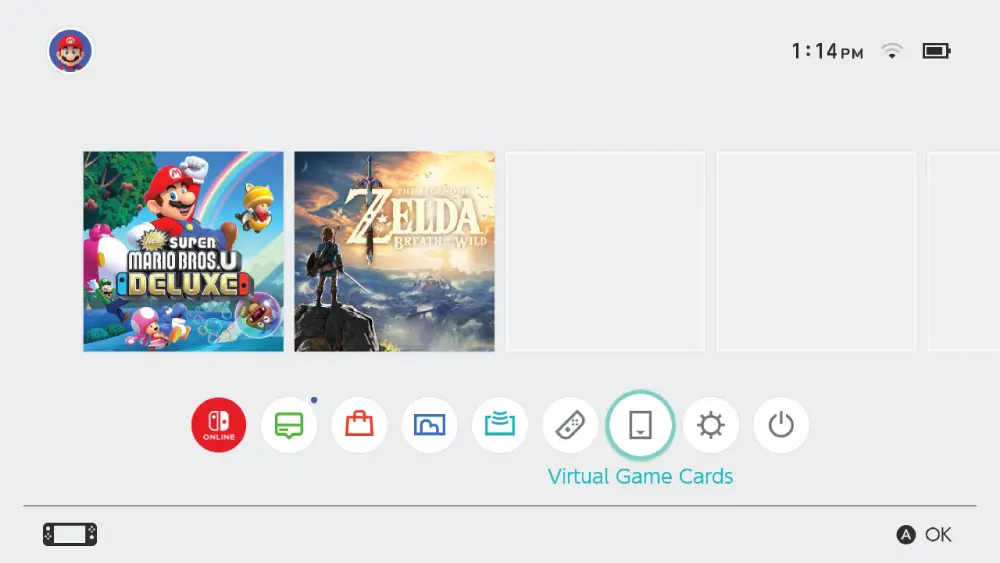
Lending a game to a family member
Only Nintendo has a system loan. You can lend up to three Virtual Game Cards at a time to family-group members, one game per borrower, for 14 days. You need to be together to start the loan, and you can't play a game while it is lent. On PlayStation, Xbox and Steam there is no loan: the family member either uses your shared console, or your shared Steam library, or gets their own copy.
Family members in another house
- PS5 / Xbox: works if the family member's console is the one you activated, wherever it is.
- Steam: Valve describes families as a household; I don't cover ways around that.
- Switch: Virtual Game Cards keep working between two linked consoles in different places once linked; a new loan needs you in the same room.
For anyone else, gifting a game is the clean option.
Subscriptions in the family
Game Pass is shared with everyone on your home Xbox. PS Plus shares online play and catalogue games on your shared PS5 or primary PS4, and child accounts can use age-appropriate Plus benefits there. Nintendo Switch Online sells a family membership for up to eight accounts. The full breakdown is on can you share Game Pass, PS Plus or NSO?
Questions people ask
Can you share games with family on PS5?
Can you share with a family member who lives in another house?
Can you lend a game to a family member?
Do child accounts get shared games?
Can you share a subscription with family?
Sources
- PlayStation Support: How to turn on PS5 Console Sharing and Offline Play — checked 2026-11-20
- PlayStation Support: Share PlayStation Plus benefits — checked 2026-11-20
- Xbox Support: How home Xbox and game sharing work — checked 2026-11-20
- Steam Support: Steam Families User Guide & FAQ — checked 2026-11-20
- Nintendo Support: Virtual Game Card Guide — checked 2026-11-20
- Nintendo: Nintendo Switch Online plans and family membership — checked 2026-11-20
- Nintendo Everything: first details for the Switch 2 / Switch gifting feature (quotes Nintendo handout) — checked 2026-11-20
- Shacknews: Nintendo is adding digital game gifting for family group members — checked 2026-11-20
How sources are counted and re-checked: editorial policy.